


TonalEnergy Tuner & Metronome
4.3763.00 Reviews
App Specs
- Version
- 2.0.6
- Updated On
- License
- $5.99
- Downloads
- 100,000+
- Developer
- TonalEnergy, Inc
- Categories
- Music & Audio
- Platform
- Android, iOS
Screenshots
 Analysis by AppCompare
I find TonalEnergy Tuner & Metronome most useful when I want several practical music tools together rather than a collection of separate apps. It brings tuning, timekeeping, listening back, and checking pitch into one practice space. That breadth is appealing, though it also means the app may feel like more than a beginner needs if all they want is a quick reference tone or a simple beat.
It is a paid music and audio app from TonalEnergy, Inc. The current version is 1.9.23, and it runs on Android 5.0 or later. Its age rating is Everyone. A 4.5 average from around 2.7K ratings, alongside more than 100K installs, suggests that it has found a substantial audience among musicians. I would still judge it by the way you practice: its strongest case is for someone who will use more than one of its tools regularly.
A toolkit built around practice
The main appeal is the connection between its functions. You can tune an instrument, work with a metronome, inspect how steady your pitch is, and record a session without changing apps. That can make practice feel more deliberate: instead of stopping to hunt for another utility, I can stay focused on the passage I am working through and use the tool that addresses the problem in front of me.
That matters most when a practice problem is not as simple as “I need a tuner.” A note may start in tune and drift as I hold it, or a rhythm may be accurate at a comfortable pace but fall apart when I add subdivisions. The pitch display and adjustable beat options give me ways to notice those patterns instead of relying only on a vague feeling that something sounded off.
Tuning and timekeeping in real sessions
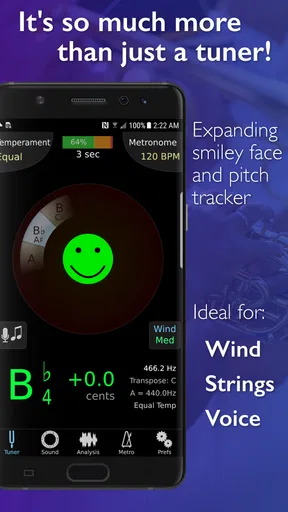
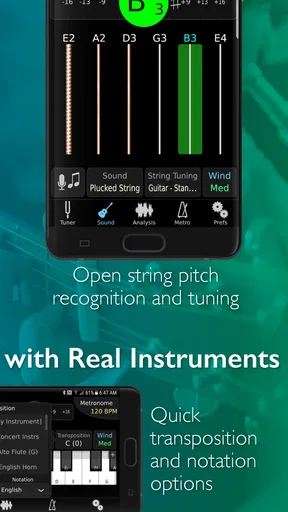
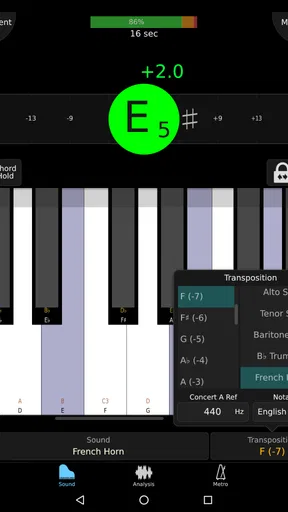
The tuner is intended for a broad range of instruments, from familiar choices such as guitar and violin to instruments such as euphonium. Its visual feedback helps show whether a note is sharp or flat and how far it sits from the target. I like that this makes tuning an active process: I can adjust, play again, and see whether the change is moving in the right direction rather than guessing by ear alone.
For a useful routine, I would tune before starting, then check again after warming up or changing to a different passage. A tuner is a reference, not a replacement for listening to how notes relate to one another, especially when playing with other musicians. In a quiet room, the display can guide careful adjustments; in a busy rehearsal, surrounding sound may make any microphone-based tuner less convenient, so I would not assume the visual reading is infallible in every environment.
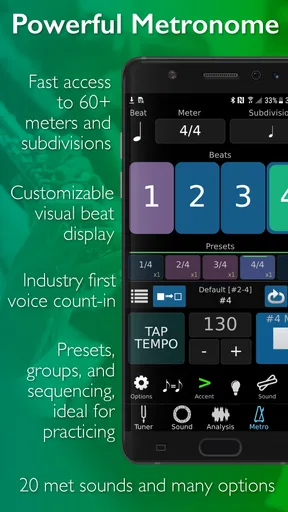
The metronome offers more than a fixed click. Tempo, time signature, beat sound, rhythms, and subdivisions can be adjusted, which is valuable when a piece has uneven accents or when a straight beat does not reveal where the timing is slipping. I would start with a clear, uncomplicated beat to learn a passage, then add subdivisions when I need to diagnose whether a note is late, early, or simply placed inconsistently.
Worth Reading Before You Choose

Switching to Android Auto Means Rethinking Your Driving Routine

Google Calendar Makes a Crowded Week Easier to Manage

Baby Panda World Brings Quick Play to Modern Phones, but Its Game Library Feels Busy

ESPN’s Live Game View Makes Following Close Games Easier

QuizzLand Review: A Good Fit for Short Trivia Breaks, Not Every Player

Basketball Stars: Multiplayer Is Fast, but Can It Recover When Matches Go Wrong?
Listening back and noticing patterns
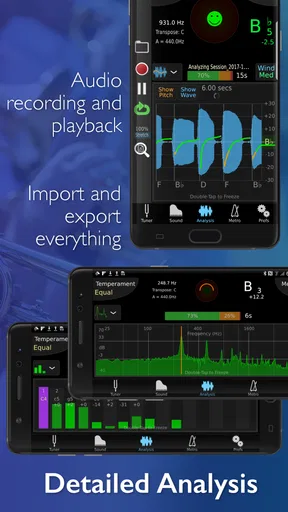
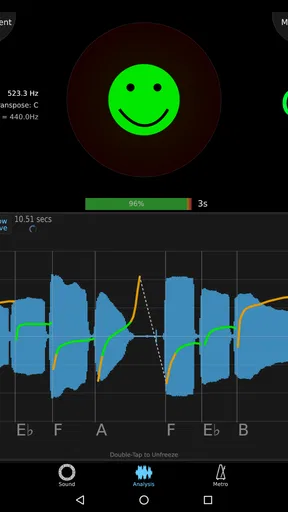
The sound analysis view can make pitch practice more revealing by showing pitch over time. Rather than checking only one note at a time, I can look for a pattern across a sustained sound and notice whether I tend to wander as I run out of breath or lose focus. That visual trace is most helpful when paired with a specific question—such as whether a held note settles quickly—rather than treated as a score of my entire performance.
Recording adds another useful check. I can capture a passage and listen back with fresh ears, which often exposes uneven rhythm or phrasing that I did not notice while playing. The music player’s track-import and play-along use can also help when I want to practice against a reference recording. These tools make the app more suitable for focused practice than a bare tuner, although recording and analysis only pay off if I take time to review what they show.
Who gets the most from it
I would recommend it to students who want visual feedback, players who work on pitch control, and musicians who regularly practice with a metronome as well as a tuner. It can also suit a teacher demonstrating how a note changes over time or helping a student hear and see a timing issue. A player who rehearses alone may appreciate being able to switch between a click, a recording, and tuning tools without building a separate setup.
On the other hand, if you only tune occasionally and already have a metronome you like, paying for a larger toolkit may not be worthwhile. A simple free tuner or metronome can be a better fit for someone who wants one task done quickly and has no interest in recording or visual analysis. Before buying, I would consider whether I will use at least two or three of the app’s roles; that is where its all-in-one approach feels most convincing.
Practical trade-offs before you settle in
The range of controls is a strength, but it can also mean a little exploration before the setup feels natural. If I open it just to tune one note, adjusting several metronome options is irrelevant; if I am programming a more involved practice beat, I need to take a moment to choose settings that actually match the musical task. I would save the more complex setup for deliberate practice and keep quick checks simple.
There is also a difference between a tool that measures and a coach that explains. A pitch trace can point out instability, but it cannot tell me whether the cause is breath support, bow pressure, embouchure, or an instrument issue. The app is most useful when I already know what I am trying to improve, or when a teacher can help interpret what I see. It supports judgment rather than replacing it.
Getting to Know TonalEnergy Tuner & Metronome
First off, let's talk about the tuner. The TonalEnergy Tuner & Metronome offers an incredibly precise tuning feature that works for a wide range of instruments. Whether you play the guitar, violin, piano, or even a more niche instrument like the euphonium, this app has got you covered. The visual display is super intuitive, showing you exactly how off-pitch you are and guiding you back to perfection. Plus, the app is smart enough to recognize the instrument you're playing, which I find pretty darn impressive.
Now, onto the metronome. It's not just a regular tick-tock affair. This metronome is as customizable as it gets. You can adjust everything from the tempo to the time signature, and even the sound of the beat itself. I love how you can set different rhythms and subdivisions, which makes practicing complex pieces way more manageable. The visual cues are also a huge help when you're trying to master tricky timing.
Features That Stand Out
What really sets this app apart are the extra features that make it more than just a tuner and metronome. The app includes a sound analysis feature that gives you detailed feedback on your playing. You can see your pitch over time, which is great for spotting when you tend to drift out of tune. And if you’re a visual learner like me, there’s a smiley face that grins wider the better you play – simply genius!
The app also has a recording feature, allowing you to capture your practice sessions. It's a fantastic tool for self-evaluation – you can listen back and pinpoint areas for improvement. And if you’re like me and sometimes forget how a piece is supposed to sound, you can even use the music player feature to import tracks and play along.
Why You'll Love It
One of the things I adore about the TonalEnergy Tuner & Metronome is its accessibility. The interface is sleek and user-friendly, so you won't spend ages trying to figure it out. It's designed to be used by musicians of all levels, from beginners just learning their scales to seasoned pros perfecting their repertoire.
The app is also incredibly versatile. Whether you’re practicing solo, with a band, or in an orchestra, it adapts to your needs. And let’s not forget about its stability – I’ve yet to experience any crashes or glitches, which is a breath of fresh air in the app world.
What I would watch for over time
The app first appeared on May 14, 2015, and its current release is version 1.9.23. That gives existing users a concrete point of reference when deciding whether an update changes anything important to their routine. I would check the version shown on my device before troubleshooting a difference in behavior, then test the tuner and metronome settings I rely on rather than assuming an update has changed every part of the experience.
For someone considering it now, the release history alone is not a reason to expect a particular feature or improvement. I would focus on whether the current tools suit my instrument and practice habits. For someone already using it, keeping a familiar setup consistent matters: a tempo, subdivision, or tuning routine that works for a piece is more valuable than changing settings simply because a newer version is available.
A realistic use case is a short evening practice after work or school. I might begin by checking a few notes, set a moderate click for a difficult passage, and slow the rhythm enough to isolate the transitions. After a few attempts, I could record the passage, listen once without playing, and decide whether the issue is timing or tone. If pitch is the concern, I could then inspect a sustained note rather than trying to fix everything at once. That sequence turns several features into a focused routine instead of a distracting tour of menus.
For ensemble players, the same tools are useful before rehearsal, but I would not treat a phone app as a substitute for the group’s shared tuning and tempo decisions. A tuner can help me arrive prepared, and a metronome can clarify a tricky entrance at home; once I am with other players, listening and responding to the ensemble still comes first. That distinction keeps the app in its best role: a personal practice aid, not an authority over musical context.
Compared with the usual alternatives, a basic tuner is quicker when all I need is a pitch reading, and a standalone metronome may be easier if I want nothing but a steady pulse. TonalEnergy’s advantage is the combination of those familiar tasks with analysis, recording, and play-along practice. The trade-off is that a musician who never uses those extra tools may be paying for breadth they will leave untouched. I would choose it over separate utilities when moving between these jobs is part of my routine, not simply because an all-in-one app sounds convenient.
It is also worth thinking about how you use a phone during practice. If notifications or screen handling interrupt your concentration, having every tool in one place will not automatically make a session more focused. I would set the app up before starting, choose the beat and sound I need, and then leave the phone alone as much as possible. The more complex the exercise, the more useful it is to decide the goal first—steady pulse, cleaner pitch, or a better-informed self-review—rather than chasing every visual indicator at once.
The app costs $5.99, so I see it as a modest but real purchase decision rather than an automatic download. If I were unsure, I would first ask whether tuning and metronome practice are both regular parts of my week and whether pitch analysis or recording would change how I work. If the answer is yes, the combination has a clear purpose. If I only need occasional tuning, a simpler alternative is likely enough. The rating and install figures offer some reassurance that it is established, but they cannot tell me whether its particular workflow matches mine.
A considered recommendation
In a world where technology is constantly evolving, having an app like TonalEnergy Tuner & Metronome feels like a bit of a game-changer. It’s more than just a tool; it’s a comprehensive practice partner that supports and enhances your musical journey. From tuning to timing, and everything in between, this app covers it all.
If you’re serious about improving your musical skills, I highly recommend giving this app a try. It’s available for both Android and iOS, ready to download whenever you are. So why not take your practice sessions to the next level? Trust me, you won’t regret it!
Pros
- Highly accurate tuning capabilities.
- User-friendly interface design.
- Comprehensive metronome features.
- Supports a wide range of instruments.
- Visual feedback enhances learning.
Cons
- Limited free version features.
- Interface can be overwhelming for beginners.
- Requires frequent updates.
- High battery consumption during use.
- No integration with other music apps.
FAQs for TonalEnergy Tuner & Metronome
What features does the TonalEnergy Tuner & Metronome offer?
TonalEnergy Tuner & Metronome provides a comprehensive suite of tools for musicians. It includes a highly accurate tuner, advanced metronome, audio analysis tools, and recording capabilities. The app supports a wide range of instruments and features customizable tuning systems, making it suitable for musicians of all levels.
Is TonalEnergy Tuner & Metronome suitable for beginners?
Yes, the app is designed for both beginners and experienced musicians. It features an intuitive interface and provides educational tools like visual feedback, pitch tracking, and practice charts. These features make it easier for beginners to understand and improve their musical skills.
Does TonalEnergy Tuner & Metronome support multiple instruments?
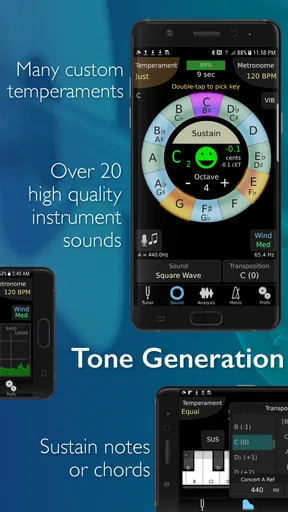
Absolutely. The app supports a vast array of instruments, including strings, brass, woodwinds, and more. It also offers various tuning systems and temperaments, allowing users to customize settings according to their specific instrument and musical style.
Can I use TonalEnergy Tuner & Metronome for live performances?
Yes, the app is equipped for live performance settings. Its metronome offers tempo and rhythm customization, and the tuner provides real-time feedback. These features, combined with its reliable audio analysis, make it a useful tool for rehearsals and live shows.
Is there a recording feature in TonalEnergy Tuner & Metronome?
Yes, TonalEnergy Tuner & Metronome includes a recording feature that allows musicians to capture their practice sessions. Users can listen back, analyze, and improve their performance. The app also supports audio sharing, making it easy to review or share recordings with teachers or fellow musicians.


